Schema Overview
All data is stored as a directed acyclic graph (DAG). The “direction” of edges encodes the order that nodes (ie experimental steps) were performed in. Put another way, edges always point ahead in time. The “acyclic” constraint ensures that nodes cannot connect upstream to older nodes, which would be travelling back in time!
The four node types are designed to cover capture the generation of materials, the measurement of these materials, and analysis of these measurements.

This is a graph for a single Sample. The four node types are shown in different colors. The edges point forward in time, and the nodes are arranged in a topological order. The graph is acyclic, so there are no loops. The graph can branch to show multiple downstream processes (in this case, an Action and Measurement) acting upon a single Material.
Allowed Node Relationships (Edges)
Each node type can only be connected to certain other node types. The allowed edges/relationships are described below.
Material Nodes

Material nodes represent a material in a given state. Every Material node follows an Action node describing how the Material was generated (whether this is an experimental Action or simply procurement of a reagent from a supplier). A Material node can be followed by either an Action (e.g. where the Material is an input to an experimental step) or a Measurement (e.g. the Material is the subject of some test or characterization).
Action Nodes

Action nodes bridge Material nodes. An Action will always generate at least one Material. The Action may also take incoming edges from Material. For example, a “mixing” Action might use upstream “solvent” and “reagent” Material. An Action can generate more than one Material, as might be the case in a “separation” Action.
Note
In real life, we usually perform a series of actions to make our final “material”. In LabGraph, sequential Action nodes must be bridged by intermediate Material nodes. LabGraph has helper functions to create these intermediates automatically. Just be aware that your graphs may have more Material nodes than you would expect just to support the graph semantics.
Measurement Nodes
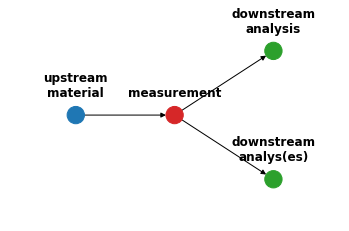
Measurement nodes are used to represent measurements of Material). A Measurement node can only be connected to a single upstream Material node, which is the Material under test. A Measurement node can be connected to any number of downstream Analysis nodes.
Analysis Nodes

Analysis nodes are used to represent the analysis of Measurement data to yield features. Analysis nodes can have any number of upstream Measurement. On the downstream side, an Analysis node can be followed by any number of other Analyses. Analysis is commonly the terminal node for a graph.
Samples (Graphs)
A Sample is a DAG of nodes that represent the materials, actions, measurements, and analyses that were performed on a single sample. Nodes are added to the database as part of a Sample. Along with the nodes, the Sample can be given tags or additional fields to make it easy to retrieve the Sample at a later time.
Additionally, hits from a node search can be expanded to the complete Sample that contains the nodes. For example, one could search for Analysis nodes named “Phase Identification” that identified some amount of a target phase. Then, by retrieving the Sample containing each of these nodes, we can compare the starting Material s and Action sequences that led to the target phase.
Actors and AnalysisMethods
When we look at Actions, Measurements, and Analyses, we’d like to track tool/method was used to perform these steps. This is important when:
you have a few different tools that can perform the same task (e.g. multiple furnaces)
you have a few different tasks that use the same tool (e.g. a liquid handler can do dilutions, mixtures, and dispenses).
you modify an instrument or analysis script over time, and you’d like to track which version was used.
This tracking is formalized and enforced through the Actor and AnalysisMethod classes. Every Action and Measurement must be associated with an Actor, and every Analysis must be associated with an AnalysisMethod.